Added
Documents and tags on Entity records
23 days ago
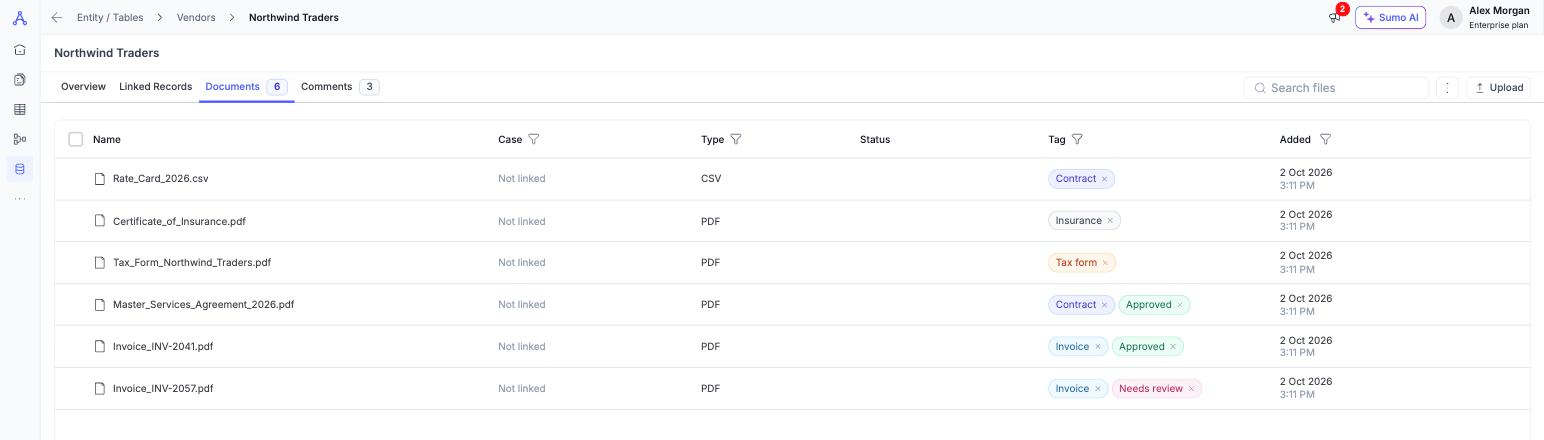
Every Entity record now has a Documents tab that keeps all of a record's files in one place. That includes files you upload directly and documents from the record's linked cases.
- Upload any file type (except SVG), up to 35 MB per file. You can tag a whole batch or individual files as you upload.
- Tags: add coloured labels such as Invoice, Contract or Needs review. Tags are shared across your organization and can be renamed, recoloured or deleted.
- Find files fast: search by name and filter by Case, Type, Status, Tag or Added date. Filters are saved in the URL, so you can share a filtered view with a teammate.
- In-app preview: view PDFs, images, spreadsheets, CSV, text, JSON, DOCX and Markdown files (up to 15 MB) without downloading them.
- Bulk actions: download up to 50 items (200 MB) as a single ZIP, or delete uploaded files in bulk.
Available to Owners and Admins. Open any record in Entity / Tables and click Documents.