Introducing an Enhanced User Interface: Streamlined Navigation and Exciting Additions!
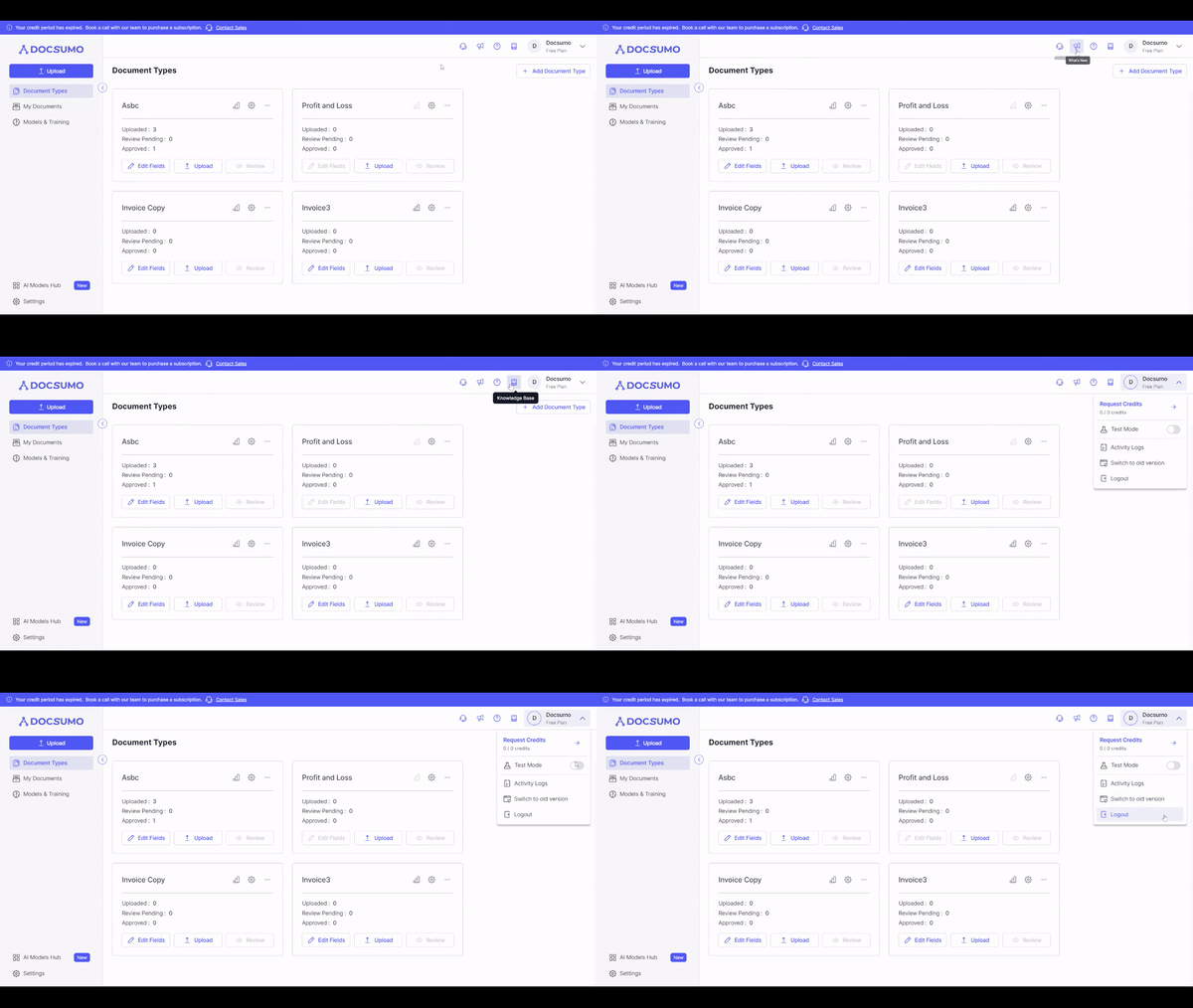
We are thrilled to unveil our latest update, which brings a fresh and improved user interface to our platform. With a focus on enhancing user experience and providing quicker access to essential features, our revamped top bar promises to make your interactions with our platform even more efficient and enjoyable.
What's New on the Top Bar?
1. Profile Section: The redesigned profile section now offers a seamless and intuitive experience. Along with familiar options like "Test Mode," "Switch to Old Design," and "Logout," we have introduced a powerful new feature: "Request Credit." You can now conveniently request credit details and schedule a demo to explore its benefits first hand.
2. Knowledge Base: Knowledge is power, and we've made it easier for you to access the valuable resources in our Knowledge Base. The Knowledge Base feature on the top bar provides quick access to a wealth of information, helping you navigate the platform effortlessly and maximize its potential.
3. Help Icon: At Docsumo, we prioritize your success and strive to offer continuous support. Clicking on the new Help Icon will instantly connect you to our friendly and knowledgeable Chatbot Assistant. The Chatbot is designed to provide quick answers to your questions, guide you through any challenges, and direct you to relevant support articles for in-depth information.
4. What's New: Stay up-to-date with all the latest enhancements, features, and announcements. The "What's New" section will keep you informed about the latest updates and improvements we bring to the platform regularly.
5. Contact Sales (Visible for Free Users): For our free users seeking to explore additional features and upgrade their experience, we've added a "Contact Sales" option. Reach out to our dedicated sales team to discuss how our premium offerings can cater to your specific needs.
Enhancements Under the Profile Section:
1. Request Credit Button: We understand the importance of credit details and how they impact your experience. Our newly introduced "Request Credit" button empowers you to access credit details conveniently. Schedule a demo to explore the full potential of this exciting feature.
2. Test Mode: Continuing from the previous version, the Test Mode feature allows you to experiment, simulate scenarios, and gain confidence in your interactions with our platform.
3. Activity Log: The Activity Log, previously known as "All Activity," is now nestled under the Profile Section. Easily review and track your interactions, actions, and updates to stay organized and informed.
4. Switch to Old Design: While we're thrilled about the new changes, we understand that some users may prefer familiarity. You can still opt to use the old design if it suits your preferences and workflows better.
5. Logout: Lastly, the Logout option remains accessible for a seamless and secure end to your session.
We are confident that these UI changes and feature additions will elevate your experience with our platform, making it more user-friendly and efficient. As always, we remain dedicated to providing you with the best possible tools and resources to meet your needs effectively.
Thank you for being a part of our journey. We value your feedback and look forward to continuously improving your experience with future updates!