
MCA Loan
Overview
The MCA Loan Agent Template is a preconfigured, end-to-end automation designed for Merchant Cash Advance loan processing. It automatically classifies incoming documents, extracts key data, runs financial analysis, applies validations, and exports structured outputs—removing the need to build agents from scratch.
This template is ideal for lenders and fintech teams processing MCA applications that include multiple document types such as bank statements, loan applications, debt schedules, and SOS documents.
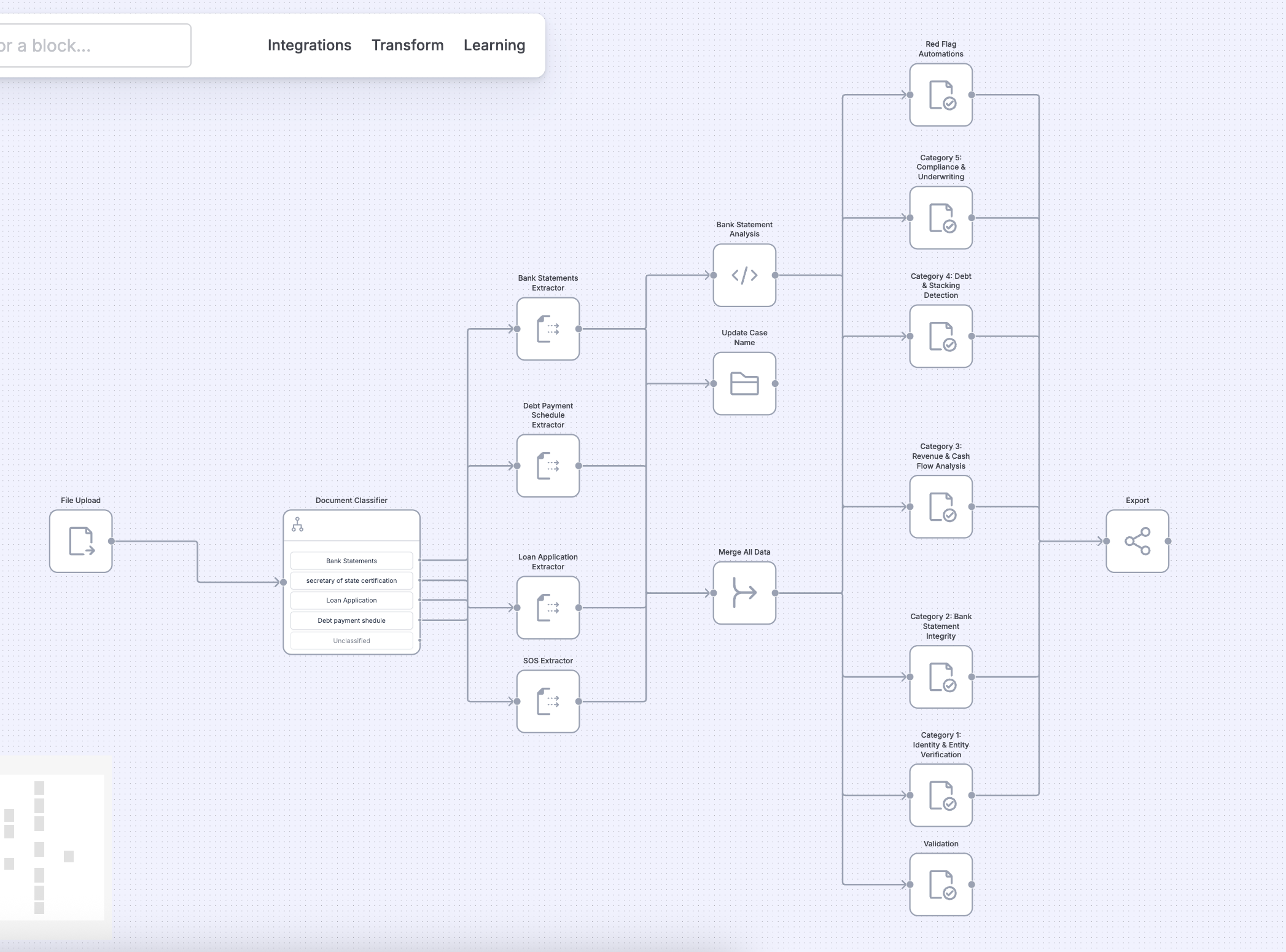
What’s included in the template
When you select the MCA Loan template, the following blocks are automatically added and configured:
Document Classification
Incoming files are classified into:
- Bank Statements
- Loan Application
- Debt Payment Schedule
- Secretary of State (SOS) Documents
- Unclassified
Each document type is routed to its respective extractor.
Data Extraction
Dedicated extractors pull structured data from:
- Bank Statements
- Loan Applications
- Debt Payment Schedules
- SOS Documents
All extracted outputs are merged into a unified dataset for downstream processing.
Bank Statement Analysis
The template runs automated financial analysis and categorization across multiple risk dimensions:
- Category 1: Identity & Entity Verification
- Category 2: Bank Statement Integrity
- Category 3: Revenue & Cash Flow Analysis
- Category 4: Debt & Stacking Detection
- Category 5: Compliance & Underwriting
- Red Flag Automations
These categories help identify inconsistencies, financial risks, and compliance issues early in the agent.
Case Updates
Key derived values are written back to the case using Case Update Block, including:
- Case name updates
- Aggregated financial metrics
- Analysis results
This ensures the case reflects the latest processed data automatically.
Validation
Built-in validations verify:
- Required fields across documents
- Financial consistency checks
- Cross-document logic
Validation results appear in the Case Overview → Validation tab for quick review.
Export
The final structured output is generated using Export Block, allowing you to:
- Combine data from all documents
- Preview the export format
- Download export-ready files for downstream systems
Typical Use Case
Automated MCA loan underwriting
Upload a borrower’s MCA application bundle and let the agent:
- Classify incoming documents
- Extract structured data from each document type
- Run financial and compliance analysis
- Detect red flags and debt stacking
- Validate extracted and derived fields
- Export clean, consolidated results
This enables faster underwriting decisions with minimal manual intervention.
Getting Started
- Navigate to Agents Builder → Templates.
- Select MCA Loan Agent Template.
- Review the preconfigured blocks.
- Customize prompts, validations, or exports if needed.
- Activate the agent and start processing cases.
Go live in minutes with a fully configured MCA agent—no need to manually set up classifiers, extractors, analysis blocks, or exports.
Need Help?
If you face any issues or have feedback, reach out to our support team at [email protected] or use the in-app chat.
Updated 3 months ago