
Agents Builder
What are Agents?
Agents in Docsumo help you automate document processing — from ingestion to data extraction, validation, and export — without needing to manually trigger each step.
Instead of processing each document individually, you can build automated flows that handle multiple operations seamlessly.
For example:
- Extract invoice data from email attachments
- Match invoices with purchase orders
- Validate extracted data before export
Each Agent workflow defines a sequence of connected steps, where each step performs a specific function such as document upload, extraction, classification, validation, or routing.
Why Use Agents?
Agents make document automation:
- Systematic: Standardize how documents are processed and reduce manual errors
- Faster: Automatically handle repetitive multi-step document tasks
- Smarter: Use AI to classify, extract, and validate data intelligently
- Integrated: Connect inputs and outputs via API or email ingestion
With Agents, you can design, test, and run your document processes exactly how your business needs them — all within Docsumo.
Key Terms
| Term | Description |
|---|---|
| Agent Workflow | A series of connected actions (steps) that automate document processing. |
| Run | A single execution of an agent — when it processes one or more documents. |
| Template | A pre-built agent for a specific use case like invoice matching, lending, or document classification. |
| Custom Agent | An agent built from scratch to fit your unique business process. |
Where to Find Agents Builder
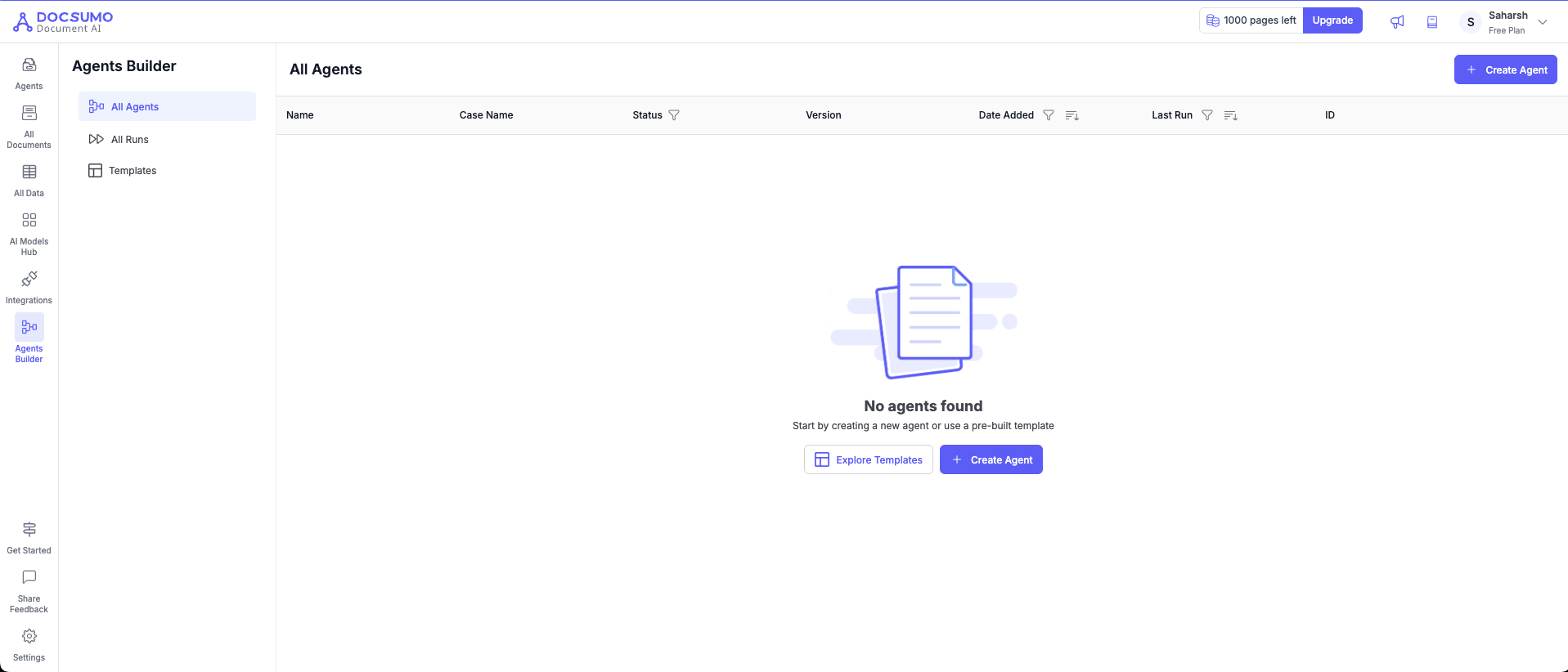
- Go to the left-hand sidebar in the Docsumo app.
- Click on Agents Builder — you’ll see three sections:
- All Agents: Displays all agents you’ve created
- All Runs: Shows execution history and status of agent runs
- Templates: Browse pre-built agent templates by use case
Creating Your First Agent
You can start in two ways:
- Create Agent: Build a new agent from scratch (Custom Agent)
- Use Template: Select from ready-to-use agents like SMB Lending or Document Processing
After choosing an option, you’ll enter the Agent Builder — a visual interface for connecting agent blocks and defining your process.
Updated 3 months ago