
Docsumo Agent Plugin for Claude Code and Codex
Connect Claude Code or Codex to your Docsumo account, and work with your documents, document types and workflows by asking in plain language.
Overview
The Docsumo plugin gives your AI coding assistant its own view of Docsumo. Ask "Which invoices are waiting for review?" or "Add a PO Number field to my Purchase Order document type", and it does the work in your Docsumo account.
The plugin adds two things to your assistant:
- A secure connection to your account. It uses your Docsumo API key, so the assistant can see and do only what you can in the app.
- Docsumo know-how. Built-in skills teach the assistant how Docsumo works, so it uses the right screens, terms and steps.
With the plugin you can:
- Check documents: see extracted values, find what's waiting in Review, approve, download and export.
- Set up document types: add or change fields, tables, prompts and processing settings.
- Fix extraction issues: ask why a value is wrong, and get the cause and a fix.
- Run workflows and cases: build, test, publish and run workflows, and sort the emails in a case type's Inbox.
- Manage Records: look up and update the reference data your lookups use.
- Get answers: ask how a Docsumo feature works. The assistant checks the Docsumo documentation.
Where it works
| App | Supported |
|---|---|
| Claude Code in the terminal | Yes |
| Claude Desktop app, in the Code tab | Yes |
| Codex | Yes |
| Regular chat in Claude (claude.ai and the Claude Desktop app) and ChatGPT | Not yet |
The Claude Desktop app's Code tab and Claude Code in the terminal share their plugins. Install the plugin in either one and it works in both.
Before you start
You need a Docsumo account and your API key. In Docsumo, open Settings › Webhook and API and copy the key. Keep it private, like a password.
Install
Claude Desktop app
- Open the Code tab, then go to Customize › Plugins.
- Choose + Add › Add marketplace.
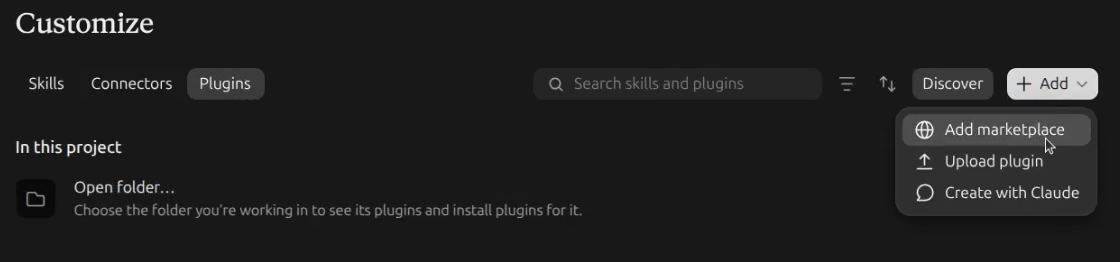
Customize › Plugins › Add › Add marketplace
- In URL, enter
docsumo/docsumo-agent-plugin, select Use "docsumo/docsumo-agent-plugin", then choose Sync.
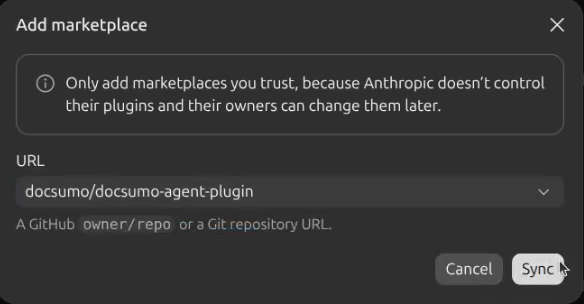
Add the Docsumo marketplace
- Open Docsumo, choose Install, then Continue. You'll see Docsumo is installed and ready to use.
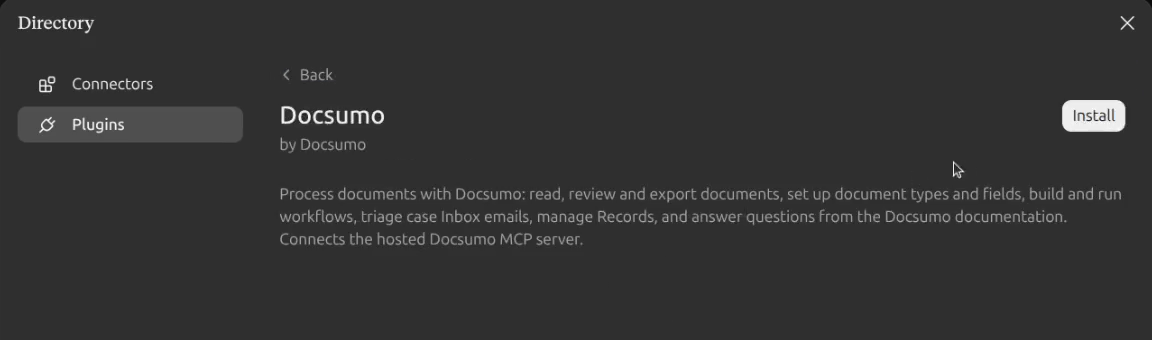
Install the Docsumo plugin
- Add your API key, as described in Add or change your API key.
Claude Code
Run this in a terminal, with your key in place of YOUR_API_KEY:
claude plugin marketplace add docsumo/docsumo-agent-plugin
claude plugin install docsumo@docsumo --config docsumo_api_key=YOUR_API_KEY
Then start a new Claude Code session, or run /reload-plugins in an open one. Claude Code keeps the key in your system's secure storage.
Codex
Run this in a terminal, with your key in place of YOUR_API_KEY:
codex plugin marketplace add docsumo/docsumo-agent-plugin
codex plugin add docsumo@docsumo
printf 'DOCSUMO_API_KEY=%s\n' 'YOUR_API_KEY' >> ~/.codex/.env
Then restart Codex. It reads the key when it starts.
Add or change your API key
| App | How |
|---|---|
| Claude Desktop app | The app doesn't ask for the key. Save the key in a plain text file, start a new session in the Code tab, attach the file and ask Claude to set up the Docsumo plugin with the key in it. When it's done, start a new session and delete the text file. |
| Claude Code | You enter the key when you install. To change it, run /plugin, open Docsumo on the Installed tab and choose Configure options. |
| Codex | Edit the DOCSUMO_API_KEY line in ~/.codex/.env, then restart Codex. |
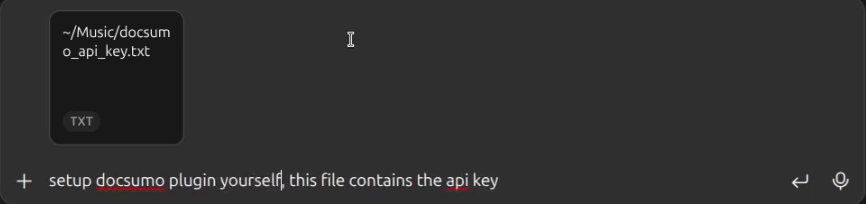
Attach the file with your key and ask Claude to set up the plugin
To switch to another Docsumo account, or after you regenerate your key in Docsumo, do the same with the new key.
Note: Don't paste your API key into a message. It stays in the conversation's history.
Check that it works
Start a new session and ask:
Which Docsumo account am I connected to?
The assistant replies with your Docsumo email and organization. If it doesn't, see Troubleshooting.
What to ask
| You want to… | Try asking |
|---|---|
| See extracted data | "Show me the extracted values of the latest document in my Invoice document type." |
| Find work in Review | "Which documents are waiting in Review?" |
| Change a document type | "Add a field for the PO number to my Purchase Order document type." |
| Fix a wrong value | "Why is the total on this document wrong?" |
| Improve extraction | "Use my reviewed documents as the reference and improve the prompts for this document type's table." |
| Sort Inbox emails | "Which emails in my Claims Inbox are waiting for review, and which case does each fit?" |
For longer tasks in Claude Code or the Claude Desktop app, switch to Auto mode so Claude works through the steps without asking you to approve each one.
Update
New versions add features and fixes.
| App | Run in a terminal |
|---|---|
| Claude Code (this also updates the Claude Desktop app) | claude plugin marketplace update docsumoclaude plugin update docsumo@docsumo |
| Codex | codex plugin marketplace upgrade docsumo |
Then start a new session, or restart Codex. In Claude Code you can also turn on automatic updates: run /plugin, open docsumo on the Marketplaces tab and choose Enable auto-update.
Install a specific version
Each release has a version tag, such as v0.1.1, on the Releases page. Install an earlier version if a new one causes a problem.
Claude Code (this also applies to the Claude Desktop app):
claude plugin marketplace remove docsumo
claude plugin marketplace add docsumo/docsumo-agent-plugin#v0.1.1
claude plugin install docsumo@docsumo --config docsumo_api_key=YOUR_API_KEY
Skip the first line for a new install. Removing the marketplace also removes the plugin and your saved key, so enter the key again.
Codex:
codex plugin remove docsumo@docsumo
codex plugin marketplace remove docsumo
codex plugin marketplace add docsumo/[email protected]
codex plugin add docsumo@docsumo
Skip the first two lines for a new install, and add your key as described under Install. An existing key stays in ~/.codex/.env.
A pinned version gets no updates. To return to the latest version, run the same steps without #v0.1.1 or @v0.1.1.
Remove
Claude Desktop app: go to Customize › Plugins, open Docsumo and choose Remove.
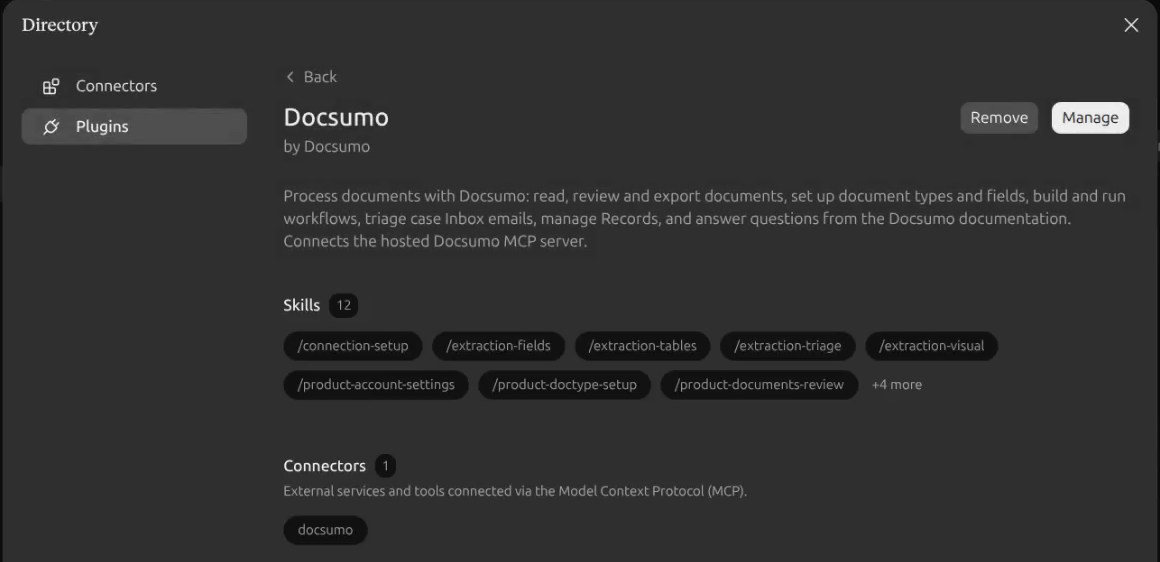
The installed plugin, with its skills, connector and the Remove button
Claude Code:
claude plugin uninstall docsumo@docsumo
claude plugin marketplace remove docsumo
This also deletes your saved API key.
Codex, in this order:
codex plugin remove docsumo@docsumo
codex plugin marketplace remove docsumo
Then delete the DOCSUMO_API_KEY line from ~/.codex/.env and restart Codex.
Good to know
- It works as you. Everything happens in your account, with your permissions.
- Credits work as in the app. Uploads, retries, changing a document's type and workflow runs that extract documents spend credits. The assistant asks you before each one.
- One key, one account. To work in a different Docsumo account, use that account's API key.
- Uploading files. The assistant uploads a file from your computer through a short-lived upload link. Docsumo keeps the file only until it's in your account. You can also upload in the app or by email, and then ask about the documents.
- New sessions pick up changes. After you install, update or change the key, start a new session.
Troubleshooting
| Problem | What to do |
|---|---|
| The assistant can't find Docsumo | Claude Desktop app: start a new session. Claude Code: start a new session or run /reload-plugins. Codex: restart Codex. |
| "Invalid or expired credential", or a missing API key | Copy your current key from Settings › Webhook and API and add it again, as described in Add or change your API key. |
| Results don't match what you see in the app | The key belongs to another account. Ask "Which Docsumo account am I connected to?" |
| "Too many requests" | Your account's API limit is shared with your other integrations. Wait a moment and try again. |
Need Help?
The plugin's source, releases and full guide are on GitHub: github.com/docsumo/docsumo-agent-plugin. For anything else, email [email protected] or use the in-app chat.
Updated about 1 hour ago